
Minutes to Decimal Hours: The Full Conversion Chart (and Why Payroll Uses It)
Minutes to decimal conversion comes down to one formula: divide by 60. 30 minutes in decimal is 0.5, 20 minutes as a decimal is 0.33, and 15 minutes in decimal is 0.25 If you’re here to check a specific value, the full 1–60 minute chart further down this page has it — no scrolling through someone else’s spreadsheet to find your number.
But the more interesting question is why decimal hours exist at all. It turns out payroll math already tried a much bigger version of this idea once before — and it failed within two years.
A Decimal Clock Was Tried Once Before — It Failed Within Two Years
In 1793, revolutionary France didn’t just redesign its calendar — it tried to redesign the clock itself. The French Republican Calendar split each day into 10 decimal hours, each hour into 100 decimal minutes, each minute into 100 decimal seconds. It was elegant on paper and unusable in practice: every clock in the country was wrong, every habit was wrong, and by 1795 the whole system was quietly abandoned.
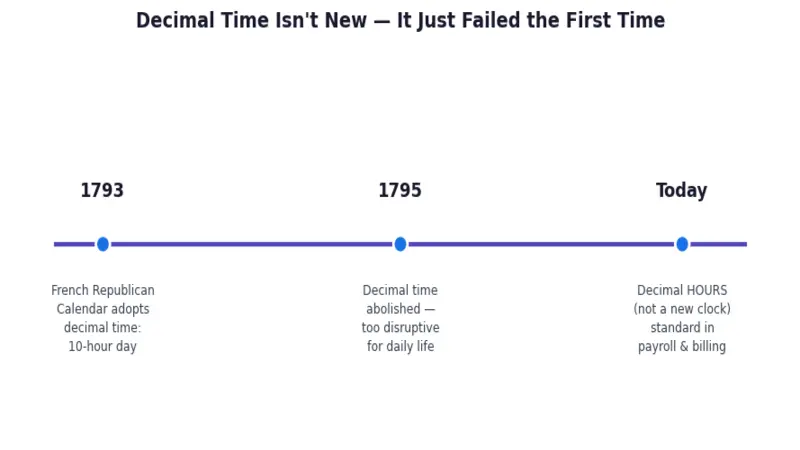
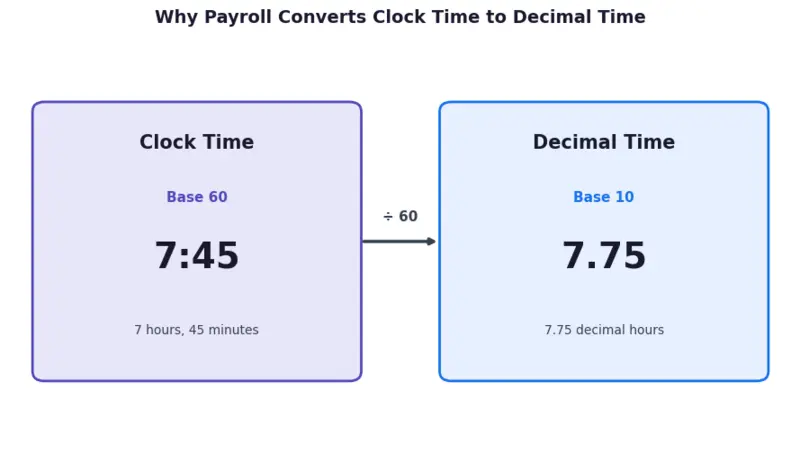
What survives today is a much smaller, more useful idea: not a new clock, just a new way of writing down clock time for math. That’s what decimal hours are — 7:45 stays 7:45 on your watch, but becomes 7.75 on a payroll sheet.
Minutes to Decimal Hours Chart
Each value below shows the minutes to decimal conversion, rounded to two decimal places — the standard most timesheet and payroll systems expect.
| Min | Decimal Hrs | Min | Decimal Hrs | Min | Decimal Hrs | Min | Decimal Hrs |
| 1 | 0.02 | 16 | 0.27 | 31 | 0.52 | 46 | 0.77 |
| 2 | 0.03 | 17 | 0.28 | 32 | 0.53 | 47 | 0.78 |
| 3 | 0.05 | 18 | 0.30 | 33 | 0.55 | 48 | 0.80 |
| 4 | 0.07 | 19 | 0.32 | 34 | 0.57 | 49 | 0.82 |
| 5 | 0.08 | 20 | 0.33 | 35 | 0.58 | 50 | 0.83 |
| 6 | 0.10 | 21 | 0.35 | 36 | 0.60 | 51 | 0.85 |
| 7 | 0.12 | 22 | 0.37 | 37 | 0.62 | 52 | 0.87 |
| 8 | 0.13 | 23 | 0.38 | 38 | 0.63 | 53 | 0.88 |
| 9 | 0.15 | 24 | 0.40 | 39 | 0.65 | 54 | 0.90 |
| 10 | 0.17 | 25 | 0.42 | 40 | 0.67 | 55 | 0.92 |
| 11 | 0.18 | 26 | 0.43 | 41 | 0.68 | 56 | 0.93 |
| 12 | 0.20 | 27 | 0.45 | 42 | 0.70 | 57 | 0.95 |
| 13 | 0.22 | 28 | 0.47 | 43 | 0.72 | 58 | 0.97 |
| 14 | 0.23 | 29 | 0.48 | 44 | 0.73 | 59 | 0.98 |
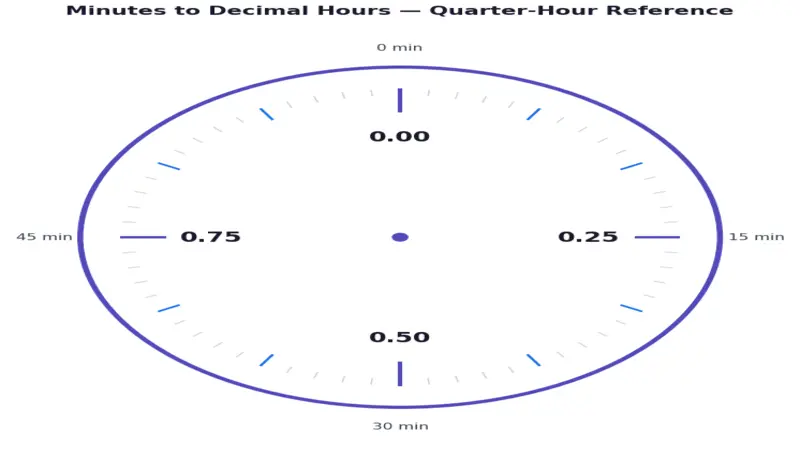
| 15 | 0.25 | 30 | 0.50 | 45 | 0.75 | 60 | 1.00 |
How to Convert Minutes to Decimals Manually
If you’d rather calculate it yourself than scan a table, the formula behind every value above is simple:
Decimal Hours = Minutes ÷ 60
How do you convert minutes into decimals?
Take your minute value and divide by 60. For 40 minutes: 40 ÷ 60 = 0.67. That’s it — no rounding rules, no lookup table required once you know the formula.
How do you change minutes into decimals when hours are involved?
Convert the minutes portion only, then add it to the whole hours. For 2 hours 40 minutes: 40 ÷ 60 = 0.67, so the total is 2.67 hours. The hours themselves never need converting — only the leftover minutes do. If you’re doing this often for a full timesheet rather than one entry, our Minutes to Hours Calculator handles the whole-hour side of the conversion in one step.
What is 30 minutes in decimals?
Exactly 0.5. Thirty minutes is precisely half an hour, so it’s one of the few values on the chart that divides evenly with no repeating decimal.
The Payroll Mistake That Costs People Real Minutes
The formula is simple, but the entry point is where things go wrong. Some payroll and timesheet systems have a field that expects a decimal number, and if you type clock time into it directly — “7:45” instead of the converted “7.75” — the system doesn’t know you meant 45 minutes. It reads the “.45” as 45 hundredths of an hour, which works out to 7 hours and 27 minutes: 18 minutes short of what was actually worked, silently, on every entry.
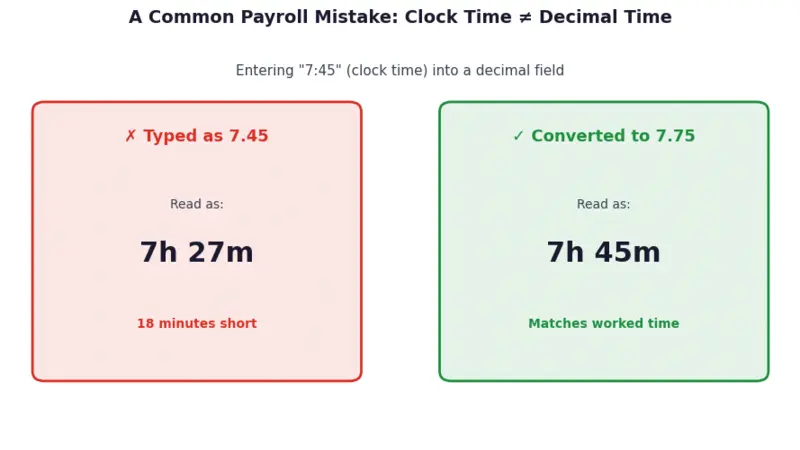
This is exactly why a reference chart or calculator matters more than it seems for something this small: the error is invisible unless you’re specifically checking for it, and across a full pay period for a full team, small entry mistakes like this add up in ways that are genuinely hard to catch after the fact.
Why Payroll and Timesheets Use Decimal Hours
Base-60 time (hours:minutes:seconds) is how clocks work, but it’s a poor format for arithmetic. Adding “2:45” and “3:30” on paper means carrying over every time the minutes pass 60 — decimal hours remove that step entirely, since 2.75 + 3.5 is ordinary addition. That’s the whole reason payroll software, spreadsheets, and billing tools standardize on decimal hours instead of clock time: multiplying an hourly rate by a decimal number is direct, while multiplying it by “7 hours 45 minutes” requires an extra conversion step first. For calculating total worked time across a full shift before converting, our Time Calculator handles the addition step separately from the decimal conversion.
How Different Industries Round Decimal Time Differently
Not every field converts minutes to decimals the same way — the industry you’re billing or reporting to often decides your rounding rule for you.
General payroll (FLSA)
Under the Fair Labor Standards Act, employers may round employee time to the nearest 5, 6, or 15 minutes, provided the rounding is neutral and doesn’t systematically shortchange workers. The most common version is the 7-minute rule: a clock-in or clock-out within the first 7 minutes of a 15-minute block rounds down, and 8–14 minutes rounds up to the next quarter-hour, as FindLaw’s guide to FLSA timekeeping rounding explains.
Legal billing
Most U.S. law firms bill in 6-minute increments (0.1 hour) — legal billing guidance from CosmoLex describes it as the de facto industry standard, since it divides an hour into 10 clean decimal units. A 20-minute client call becomes 0.3 hours on the invoice, not the 0.33 you’d get from straight division.
Healthcare (Medicare/CMS)
Time-based CPT billing codes — used for physical therapy, occupational therapy, and similar timed services — are billed in 15-minute units, under what’s known as the 8-minute rule: at least 8 minutes of direct treatment must be provided to bill a full unit, so 22 minutes of therapy bills as 1 unit while 23 minutes bills as 2, per AMA CPT guidance summarized by Premera Blue Cross.
The takeaway: the ÷60 formula on this page gives you the mathematically exact decimal value every time — but if you’re entering time into a specific payroll, legal, or medical billing system, check whether that system expects its own rounding convention before you submit the number.
Converting Minutes to Decimal Hours in Excel or Google Sheets
For one-off conversions the chart above is fastest, but for a full timesheet or batch of entries, a spreadsheet formula handles it in one drag. If you first need to total up clock-in and clock-out times before converting, our Date and Time Difference Calculator gets you the raw hours-and-minutes figure to plug into the formulas below:
- If minutes are stored as a plain number (e.g., 45 in cell A1): use =A1/60
- If time is stored in HH:MM format (e.g., 7:45 in cell A1, formatted as Time): use =A1*24 — Excel and Sheets store time internally as a fraction of a 24-hour day, so multiplying by 24 converts it to decimal hours
- To convert a whole column at once, enter the formula in the first row and drag the fill handle down — no need to re-type it for every entry
One formatting note that trips people up: if the result cell is still formatted as “Time” instead of “Number” or “General,” Excel will keep displaying it as a clock value even though the underlying calculation is correct. Reformat the cell to Number with two decimal places to see the actual decimal hour value.
Common Mistakes When Converting Minutes to Decimal Hours
Beyond the clock-time entry mistake above, a few other slips come up often enough to flag:
- Forgetting to carry the whole hour. If you worked 1 hour 45 minutes, the answer is 1.75, not 0.75 — people sometimes convert only the minutes and drop the leading hour by accident.
- Rounding too early. If you’re summing several time entries, convert each one to its full decimal value first, then add, then round the total. Rounding each entry individually before adding can shift your final total by a few hundredths of an hour — small on paper, but it compounds across a full timesheet.
- Using 100 instead of 60 as the divisor. This is the single most common manual-math slip — dividing minutes by 100 instead of 60 gives you a number that looks plausible (45 minutes becomes 0.45 instead of the correct 0.75) but is wrong every time.
Frequently Asked Questions
How many minutes in decimal is 20 minutes?
20 minutes as a decimal is 0.33 hours (20 ÷ 60 = 0.333, rounded to two decimal places). It’s one of the more commonly searched values because it doesn’t divide evenly, unlike 15, 30, or 45 minutes.
What is 10 minutes in decimal?
10 minutes in decimal is 0.17 hours (10 ÷ 60 = 0.1667, rounded). For payroll systems that round to the nearest tenth instead of hundredth, this is typically recorded as 0.2.
What is 40 minutes in decimal?
40 minutes in decimal is 0.67 hours (40 ÷ 60 = 0.6667, rounded to two decimal places).
Why do payroll systems use decimal hours instead of hours and minutes?
Because payroll math is multiplication (hours × pay rate), and decimal numbers multiply directly while base-60 clock time doesn’t. Converting once at data entry avoids repeated manual conversion at every calculation step downstream.
Do I round decimal hours up or down?
It depends on your organization’s policy — some round to the nearest hundredth, others to the nearest quarter-hour (0.25 increments) for simplicity. When in doubt, use the unrounded value for your own records and let your payroll system apply its own rounding rule, so your source numbers stay accurate even if the displayed total is rounded.
Convert Your Own Numbers Instantly
For one-off conversions or bulk entries, skip the manual math entirely with our free Minutes to Decimal Hours Calculator — enter any number of minutes and get the decimal hour value instantly, with adjustable rounding.